Node.js runs your JavaScript on a single thread, yet it can handle thousands of concurrent tasks efficiently. How? The answer is the event loop: a mechanism that delegates I/O to the operating system and processes results as they arrive, instead of blocking and waiting.
In this article, we'll look at what the event loop is, how it compares to other concurrency models (processes, threads, goroutines), and how the Node.js event loop actually works under the hood: its phases, timers, and scheduling priorities.
What is an event loop?
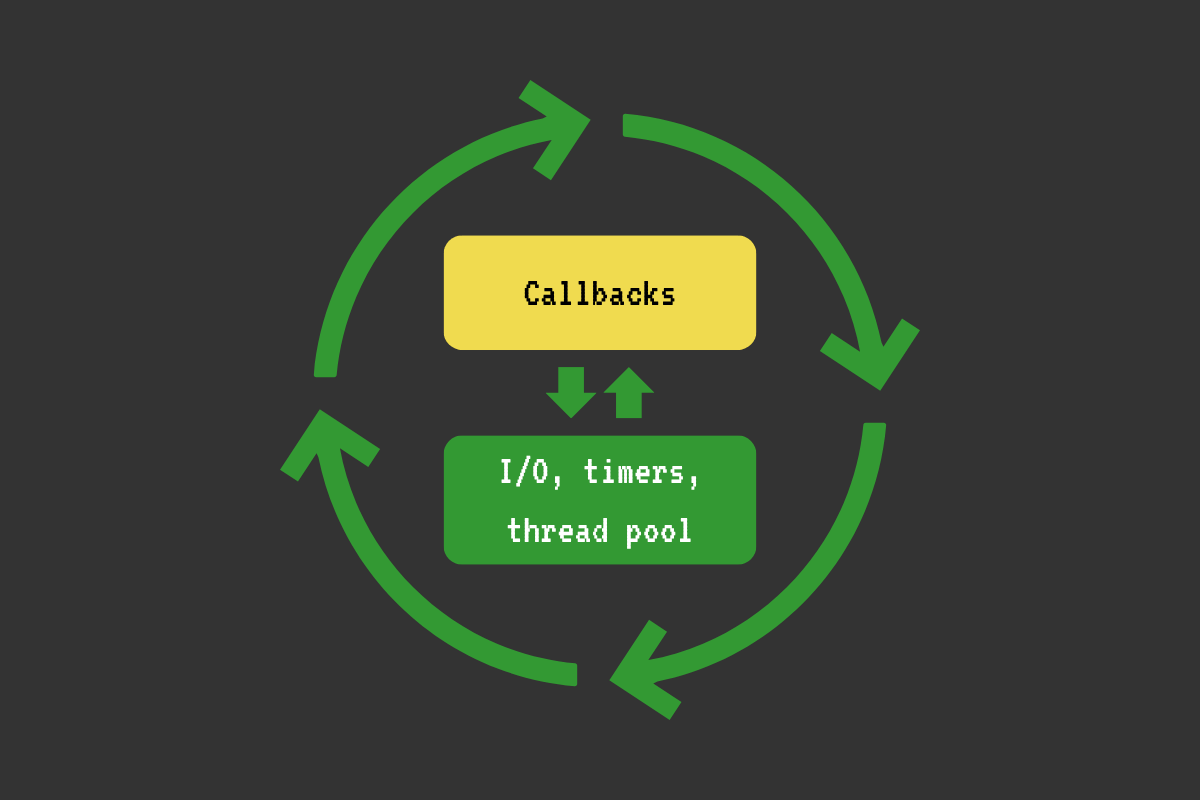
The event loop is a mechanism that allows you to manage multiple concurrent tasks on a single thread. It is basically a while loop that continuously schedules and processes multiple events, such as network and file I/O, timers, and custom events. For each event, we run the relevant callback if applicable.
The event loop uses complex operating system APIs, such as asynchronous I/O and threads, to manage I/O and other asynchronous operations (e.g., timer callbacks).
Below is a very simplified example of an event loop:
int main() {
  while (loop_alive) {
    // ...

    // Check and run timers.
    //
    // Example:
    // When we call setTimeout(callback, 1000), the event loop does the following:
    // 1. Adds this timer to the timers priority queue
    // 2. Continues with the current cycle (moves to the next phase)
    // 3. In every next cycle, it checks if the timer is ready
    // 4. And when the timer is ready, it calls the callback
    check_and_run_timers();

    // Poll the operating system for whether various I/O is ready for processing
    // (e.g., a connection on a network socket, a file read/write operation).
    //
    // Example:
    // When we call http.get('http://example.com/some-data', callback), the event loop does the following:
    // 1. Opens a TCP socket with a connection to example.com
    // 2. Sends the data over to the other end: "GET /some-data HTTP/1.1..."
    // 3. In each cycle, it polls the OS about this socket (e.g., Can we read the response data?)
    // 4. When the OS says that the socket is ready to read, it reads the data
    // 5. It runs our code (callback) with the data as soon as it can
    poll_io();

    // Run some other scheduled tasks/callbacks.
    run_some_other_tasks();

    // ...
  }

  return 0;
}
I'm using the above example to enable a more concrete thinking about the event loop. It's a while loop that manages I/O and runs your code. I/O is offloaded to the operating system's asynchronous APIs or auxiliary threads. When various I/O events complete, the loop processes them and executes your code with the output on its main thread.
Approaches to handling concurrent tasks
An event loop lets a single thread handle thousands of concurrent I/O operations efficiently, without the memory overhead of creating a thread or process per request. But it's not the only approach. Let's compare a few.
Let's say we want to build a web app. A web app should be able to handle a large number of concurrent network requests.
Network requests are I/O operations (we read and write data to and from network sockets).
The I/O operations can be blocking and non-blocking.
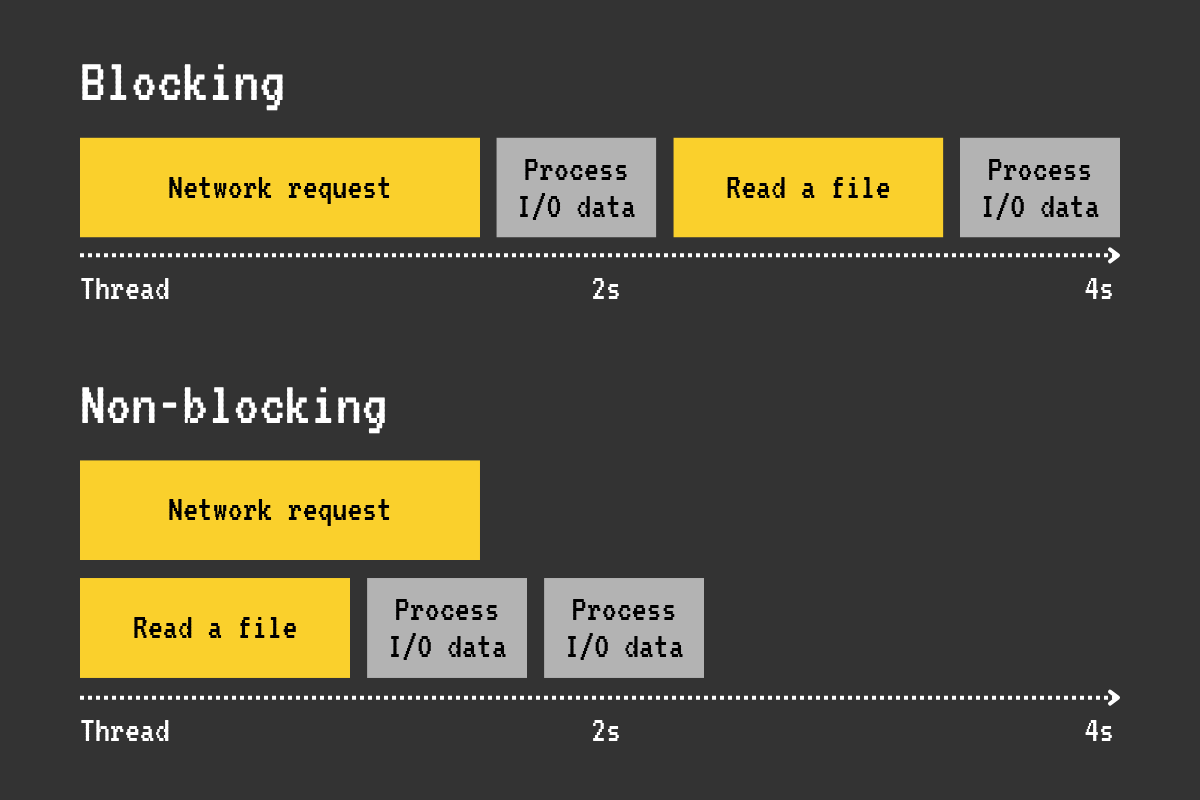
The blocking operations are easy to understand because they are straightforward. Check the following example:
int main() {
  // for each request:
  DB* db = db_connect("connection_string");
  Result* result = db_query(db, "SELECT id, email FROM users LIMIT 10");
  // Handle the result
}
The thread will block at the line where we call db_query; it will wait for the database query to complete before continuing. The problem here is that, when we handle multiple requests on a single thread with blocking I/O, each request must wait for the previous one to complete. So, some requests will be handled quickly, while others will have to wait a long time in the queue. And this is not optimal.
The non-blocking operations allow the thread to proceed immediately. For example, we tell the operating system to make a network request and proceed with something else on the same thread. Then we poll the operating system periodically to see if the request is ready; if so, we handle it. Therefore, handling non-blocking operations is much harder.
Let's take a look at a couple of ways we could deal with concurrent requests.
Way 1: Handle each request in a separate process
How
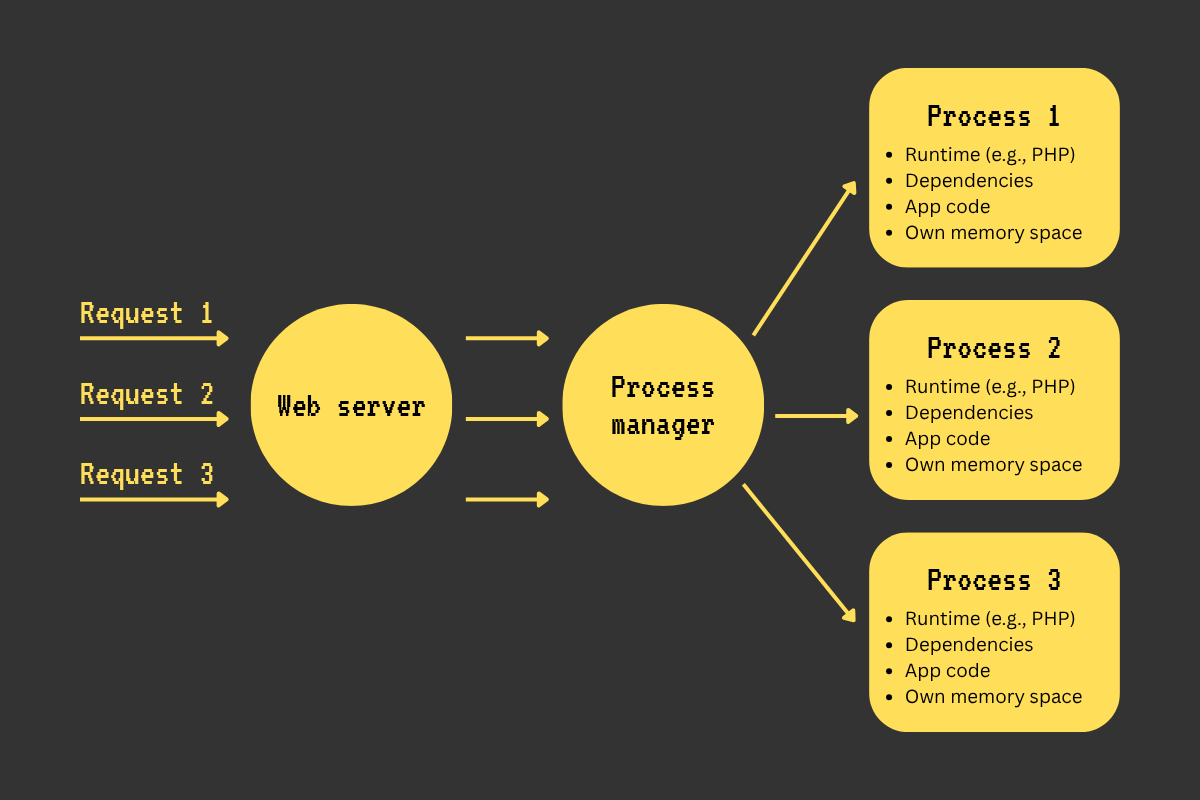
A web server program (e.g., Apache, Nginx) accepts a request, forwards it to a program that manages a pool of our web app processes (e.g., PHP-FPM), and then forwards it to one of the free processes in its pool.
Real-world example
Nginx -> PHP-FPM -> one of multiple web app processes.
Advantages
- This model is easy to reason about: one request -> one process.
- Great isolation between requests
- Data from one request can’t be passed to another.
- If one request crashes a process, other concurrent requests still get handled by other processes.
- CPU-heavy tasks on some requests don't block other requests.
Disadvantages
- High memory usage (each process loads the entire runtime (e.g., PHP) and its dependencies, which eats a good chunk of memory).
- High overhead when context switching
- Each process has its own memory address space (a chunk of memory it can access). Accessing memory (RAM) is expensive. So, the CPU caches the memory used by processes. But the cache is too small to accommodate all processes. So when switching between processes, the CPU might need to clear the cache of one process to accommodate another one (cache eviction). Therefore, when there are too many processes, cache eviction increases, leading to more RAM accesses and slower execution.
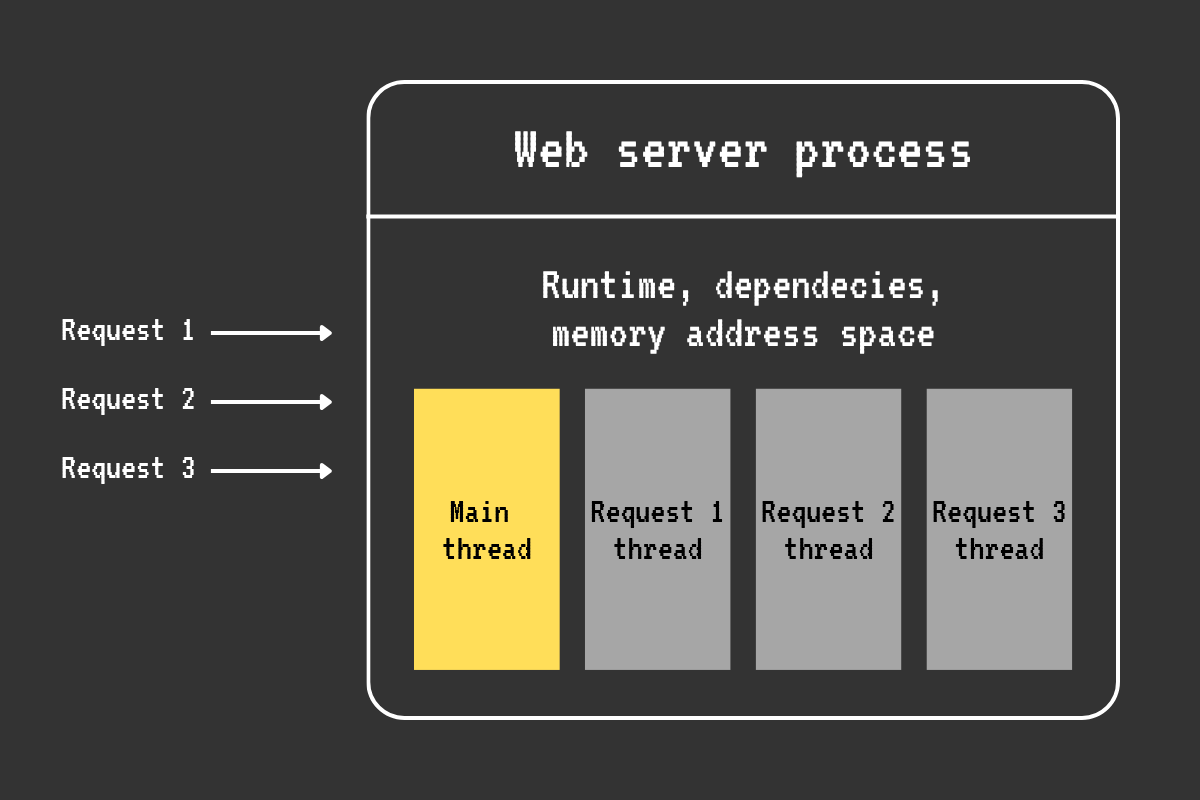
Way 2: Handle each request in a separate thread
How
A single web app process processes each concurrent connection via a separate thread. Usually, concurrent requests are processed by a pool of reusable threads to avoid starving the system.
Real-world example
Advantages
- The mental model is still quite simple: one request -> one thread.
- Better with CPU caching than the per-process approach, because threads share the memory address space of their parent process.
- Multiple threads can run on different CPU cores in isolation, so CPU-intensive tasks are handled more effectively than in the single-threaded approach.
- If one request causes a thread to crash, the other threads continue to run.
Disadvantages
- Much heavier on the memory compared to the single-threaded event loop approach with non-blocking I/O or the lightweight threads approach (e.g., Go and its goroutines).
- The cost of context switching and cache invalidation is still quite high.
- You have to tune the thread pool size to account for the expected amount of load and available resources.
- With thousands of slow network requests or long-lived connections (e.g., websockets), the blocked threads occupy their memory: they hang around, but don't do work, which is not an optimal use of resources.
Way 3: Use Go goroutines to handle thousands of requests concurrently
How
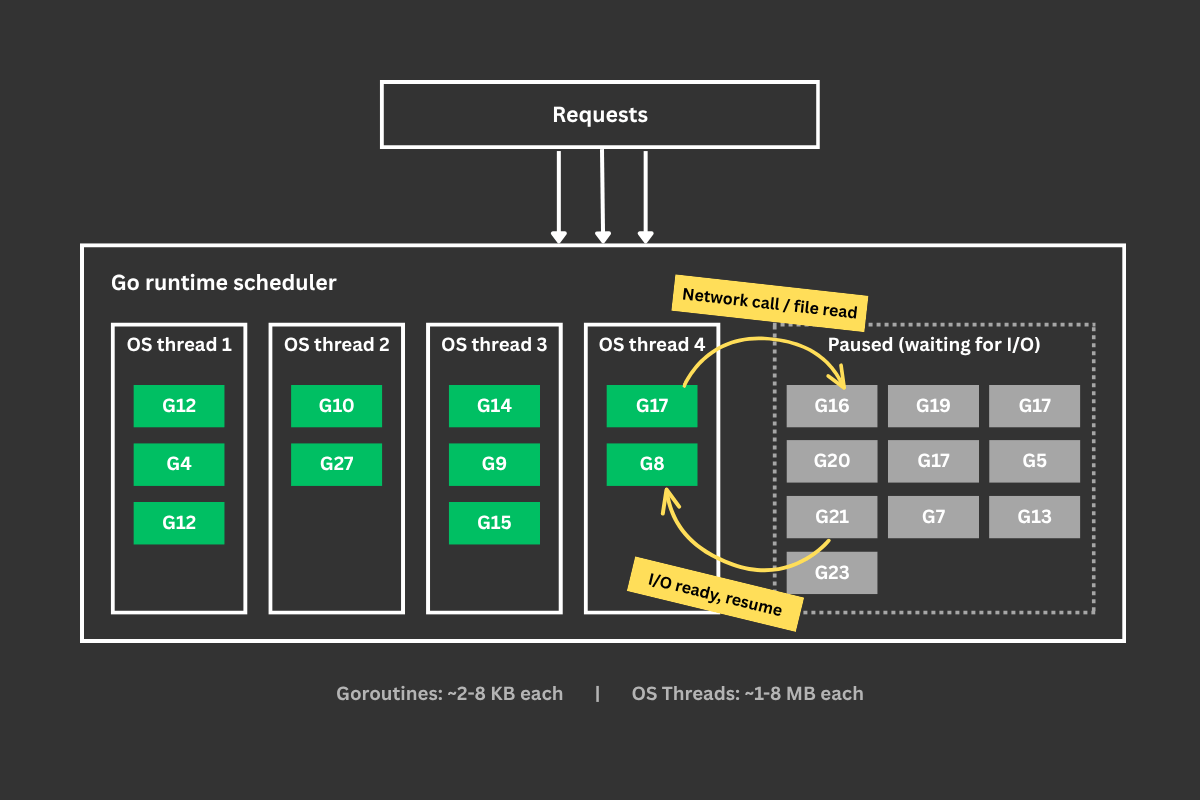
Each request is handled by a goroutine (a lightweight "thread").
Goroutines are not operating system threads; they are blocks of code that are scheduled to run on a bunch of real operating system threads by the Go runtime.
Goroutines are very lightweight (they usually start with just a few KB). So thousands of goroutines can easily co-exist with a relatively small memory footprint.
When a goroutine waits (e.g., making a network request, reading a file), it is paused, and the thread runs another goroutine.
Real-world example
The built-in net/http server in Go.
Advantages
- Efficiency is close to that of event loops for I/O-heavy concurrent workloads.
- Extremely memory-efficient compared to the approach with threads.
- Much less context switching, because goroutines run on a limited number of operating system threads.
- Good CPU cache reuse rate.
Disadvantages
- Goroutines can leak if not properly managed (e.g., a goroutine blocked on a channel that's never closed), and debugging these leaks is hard.
- Have to take care of isolation between requests, because goroutines belong to the same process and share global variables, heap memory, caches, singleton objects, etc. Proper synchronization (mutexes, channels) is required to avoid data races.
Way 4: Use an event loop with non-blocking I/O to handle thousands of requests concurrently
How
Instead of dedicating one thread per request, an event loop handles multiple concurrent requests on a single thread as events. It does this via utilizing the operating system’s non-blocking I/O APIs and a number of helper threads.
For example, the event loop receives a request, calls your callback, and your callback starts a database query. While this query is in flight, the event loop handles other requests, then returns to your callback when the query is ready.
Real-world examples
Node.js, Deno, Python asyncio, etc.
Advantages
- No 1 request per thread memory overhead. We avoid the cost of keeping hundreds of threads. We can handle thousands to tens of thousands of connections with a relatively small memory usage.
- Minimal context switching, because only a few threads are used.
- Better CPU cache usage, because all requests are handled by a single process and a small number of threads.
Disadvantages
- If you do something CPU-bound or blocking, the entire event loop freezes and all requests stall.
- Requests are not isolated. One request can crash the whole loop.
- The logic may look a bit more complex than with the blocking approach, since you need to wrap your head around callbacks, async/await, and logical race conditions.
The Node.js event loop
The Node.js runtime uses the event loop to handle thousands of concurrent I/O-bound tasks with a relatively small memory footprint.
Node.js uses a C library called libuv for cross-platform event loop, asynchronous I/O, timers, child processes, and thread pool functionality. libuv maintains a thread pool (4 threads by default, configurable viaUV_THREADPOOL_SIZE) for operations that don’t use async OS APIs, such as Linux file system operations and DNS lookups.
When you start Node.js, it initializes the event loop, runs your JavaScript code using V8, and starts the loop. If your code initiates an async action (e.g., setTimeout, fetch), the loop handles the supporting logic, such as calling your timeout callback at the right time or using low-level operating system APIs to make a network request.
Basically, the event loop is a while loop that manages asynchronous processes (I/O and timers) and runs your code (callbacks) on relevant events. On each cycle, the loop traverses a number of phases, executing various logic, such as handling I/O, timers, running callbacks, and cleaning up. In each phase, the loop executes a relevant FIFO queue of callbacks.
The loop looks roughly like this:
while (loop is alive) {
  pending callbacks
  idle callbacks
  prepare callbacks
  poll for I/O
  check callbacks
  close callbacks
  timers
}- Pending callbacks: deferred I/O callbacks.
- Idle, prepare: used internally.
- Poll for I/O: the loop polls the OS for the ready I/O operations, processes them, and executes our JS callbacks (e.g., data available on a network connection, file read data arrived, etc.).
- Check phase: runs
setImmediatecallbacks. - Close callbacks: cleanup callbacks (e.g., a socket being closed).
- Timers: runs
setTimeout()andsetInterval()callbacks.
Note: before libuv 1.45.0 (Node.js < 20), timers ran at the top of the loop (before pending callbacks), not at the bottom. The current ordering shown above reflects how the loop works since Node.js 20.
If there are no asynchronous I/O or timers remaining, the loop stops and the program exits.
You can look at the actual event loop source code in the libuv repo: src/unix/core.c (the uv_run function).
The poll phase
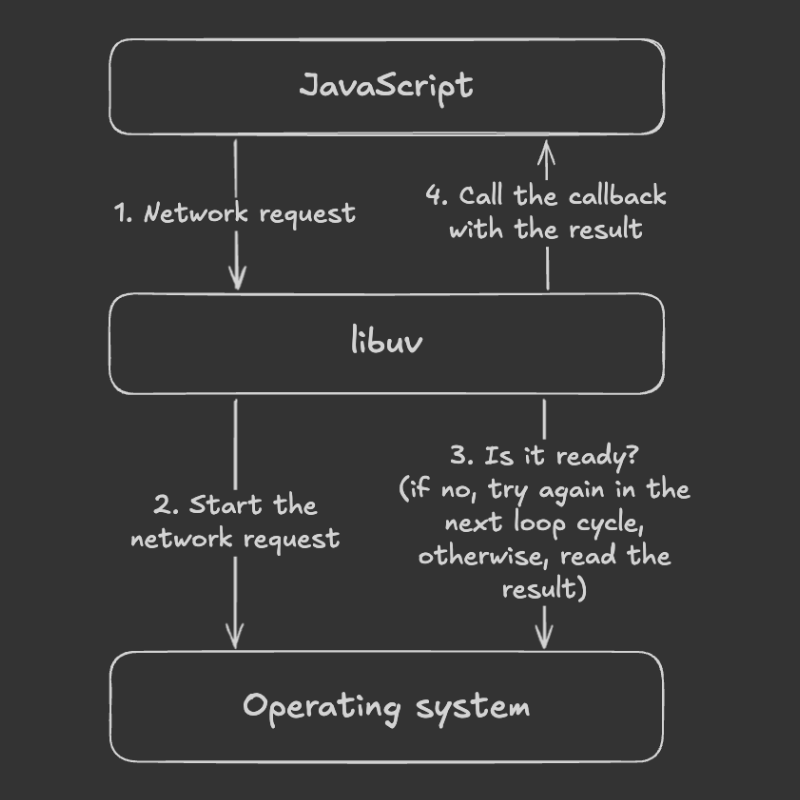
When we start an I/O operation in our JavaScript code, Node.js uses the libuv API to run it. libuv tells the OS: “Hey, OS! Please do this operation for me, and I’ll check back later to see if it’s ready!” The poll phase is when the libuv checks if the I/O operations we started are ready and calls our callbacks. From here, some callbacks might be deferred to the “pending callbacks” phase.
The check phase
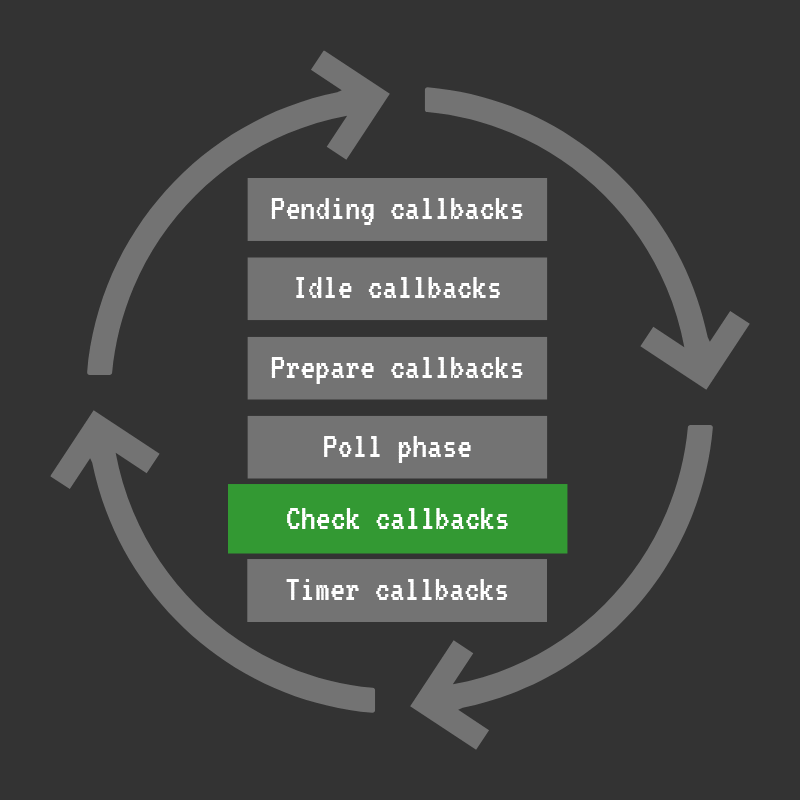
The check phase runs right after the I/O poll phase. OursetImmediate callbacks are executed here. So, setImmediate lets us execute our code exactly after the I/O poll completes.
The poll phase runs I/O callbacks sequentially. Therefore, if our callback does some heavy work, it blocks other callbacks until it’s done. So, we can use setImmediate to defer the heavy part until all I/O callbacks are processed in the poll phase, which is expected to make the app more responsive.
Also, we can use setImmediate to process a CPU-intensive task in chunks (e.g., one chunk per loop cycle) so other code can still run in between.
The timers phase
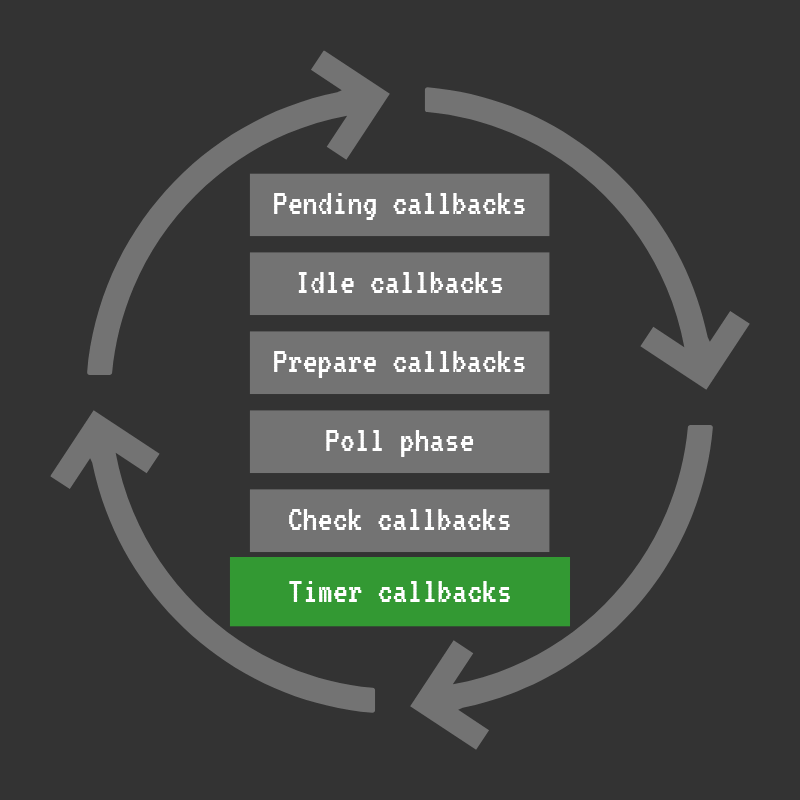
The callbacks you schedule using setTimeout andsetInterval run in this phase.
When you schedule a timer callback, libuv inserts it into a min-heap. And on every cycle, the loop grabs the callbacks whose delay has elapsed and runs them.
It’s important to note that timer callbacks run after the delay you specify, but they can be further delayed by the operating system scheduling or the running of other callbacks. For example, when you do setTimeout(callback, 100), your callback can actually be executed a bit later (e.g, in 110 or 120 milliseconds).
process.nextTick
The process.nextTick schedules a high-priority callback to be executed at the end of the current tick, before the event loop continues to the next phase. Each time libuv/Node.js invokes JavaScript to handle an event, that execution is called a tick (in other words: each JavaScript invocation from the C/C++ layer).
If you call the process.nextTick callbacks recursively, they will starve the loop.
Microtasks
Microtasks are the callbacks from promises (.then, .catch, and .finally) and queueMicrotask(). They run after the currently executing JavaScript, right after the nextTickcallbacks.
process.nextTick and microtasks vs setImmediate
The nextTick callbacks and microtasks run after each JavaScript invocation, while the setImmediate callbacks run once per loop cycle in a specific phase (the check phase). Note that nextTick callbacks always run before microtasks (promise callbacks), so process.nextTick has higher priority than queueMicrotask and .then/.catch/.finally.
setTimeout(() => console.log("setTimeout"), 0);
setImmediate(() => console.log("setImmediate"));
process.nextTick(() => console.log("nextTick"));
Promise.resolve().then(() => console.log("promise"));

// Output:
// nextTick
// promise
// setTimeout / setImmediate (order between these two is non-deterministic)
When this code runs at the top level (outside of any async callback), the order of setTimeout and setImmediate is non-deterministic. It depends on how quickly the loop starts and whether the timer's threshold has already elapsed by the time the timers phase runs. However, inside an I/O callback,setImmediate always fires before setTimeout, because the check phase runs right after the poll phase:
const fs = require("fs");

fs.readFile(__filename, () => {
  setTimeout(() => console.log("setTimeout"), 0);
  setImmediate(() => console.log("setImmediate"));
});

// Output (always):
// setImmediate
// setTimeout